Troubleshooting Guide. Use the following steps to diagnose why the Sensefuel search layer is not appearing on your website.
1. Verify That the Sensefuel Main JavaScript Tag Is Loaded
✅ Step 1 — Open your browser DevTools
- Open your website.
- Open Developer Tools (F12).
- Go to the Network panel.
✅ Step 2 — Filter requests
- Click the funnel icon (filter).
- Type:
tagp
✅ Step 3 — Interpret the result
If tagp.js is NOT visible
➡ The Sensefuel JavaScript tag is not loaded on your page.
You should:
- Check with your IT team
- Verify your Tag Management System (GTM or equivalent)
If tagp.js IS visible
➡ The tag is correctly loaded.
Proceed to the next section.
2. Verify That the Correct Sensefuel JavaScript Tag Is Loaded
✅ Step 1 — Inspect the file
- Click on
tagp.jsin the Network list. - Open the Headers tab.
✅ Step 2 — Compare URLs
Check that the Request URL is strictly identical to the one provided in your Sensefuel data environment in the TAG section (in the sf.src parameter).
If the URL is different (the UUID within the url)
➡ Your page is loading the wrong Sensefuel tag.
You should verify:
- Your Tag Management System configuration
- Your IT team’s deployment
If the URL is identical
➡ The correct tag is loading.
Continue with the next section.
3. Verify the Sensefuel Deployment Step
✅ Step 1 — Access the Sensefuel platform
- Go to Layer
- Then open Deployment
✅ Step 2 — Check deployment progress
If deployment step is 0%, 20%, or 50%
This may prevent the search layer from appearing.
✅ Toggle “Force Sensefuel on this browser”
(Available only in Google Chrome)
If deployment step is 100%
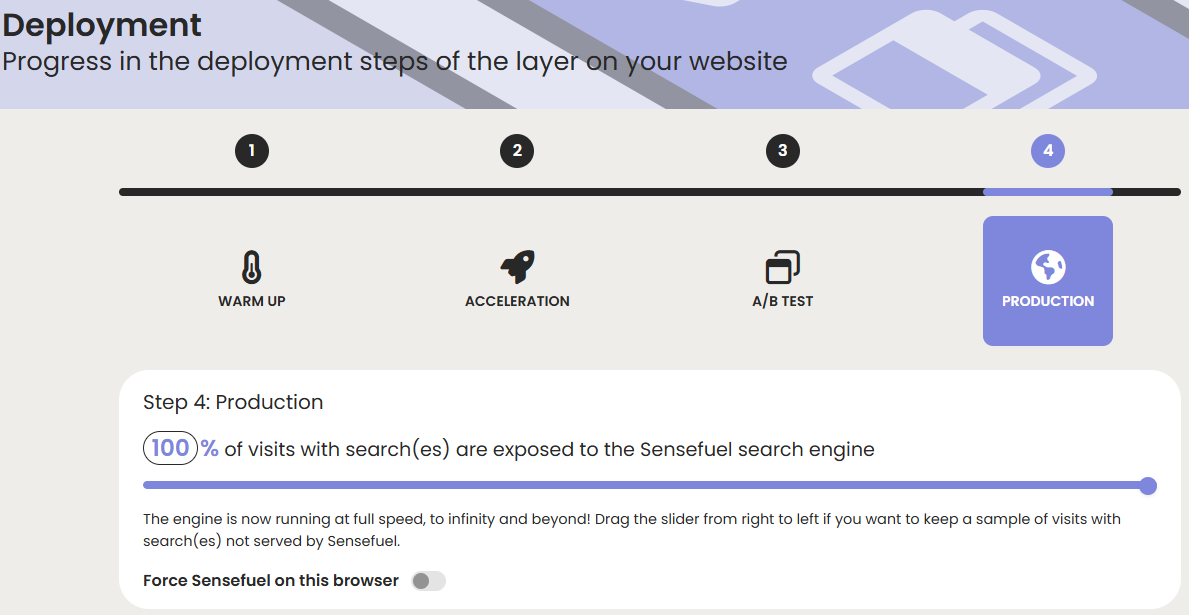
➡ Proceed to the next check.
4. Check Your Browser Ad Blocker
Ad blockers may block:
- Your Tag Management System (GTM)
- The Sensefuel JavaScript tag itself
✅ Step 1 — Check for an ad blocker
If one is installed:
- Disable the ad blocker
- Reload the page
- Check if the search layer appears
✅ If the layer appears after disabling the ad blocker
➡ Your ad blocker is blocking part of the Sensefuel setup.
You may consider switching to a 1st‑party JavaScript tag to avoid this issue.
5. Still Not Working?
If the steps above do not solve the issue, please contact our Helpdesk for further assistance.